动手做 AI Agent - 黄佳
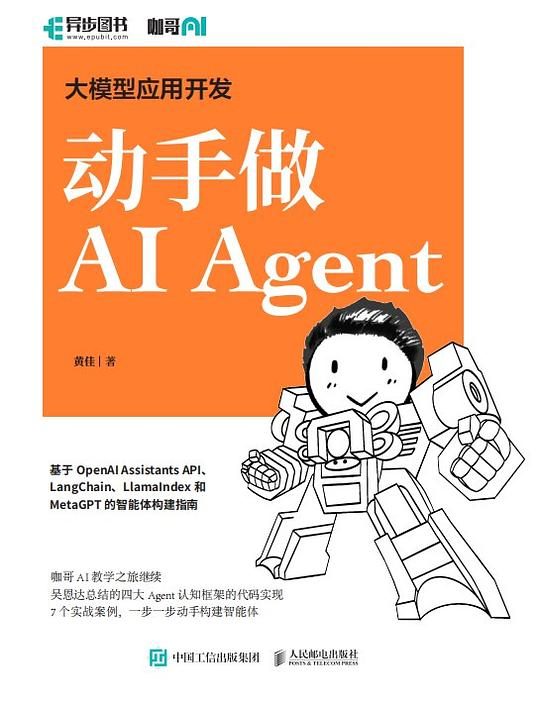
本书将探索 Agent 的奥秘,通过带着读者动手做 7 个功能强大的 Agent,全方位解析 Agent 的设计与实现,涵盖 GPT-4 模型、OpenAI Assistants API、LangChain、LlamaIndex 和 MetaGPT 等尖端技术。
关于作者
黄佳 是人工智能领域的技术作家和教育者:
- AI 技术专家:专注于大模型应用和 Agent 开发
- 技术作家:著有多本 AI 和机器学习相关书籍
- 实践派教育者:擅长通过实战项目教学
黄佳以其"动手做"的教学风格著称,通过大量代码示例和实战项目,帮助开发者快速掌握 AI 应用开发技能。
核心内容
1. AI Agent 基础架构
# Agent 基本组成
# 1. 感知 (Perception): 接收输入信息
# 2. 思考 (Reasoning): 基于 LLM 进行推理
# 3. 行动 (Action): 调用工具执行任务
# 4. 记忆 (Memory): 存储和检索信息

from typing import List, Optional
from abc import ABC, abstractmethod

class BaseAgent(ABC):
    def __init__(self, llm, tools=None, memory=None):
        self.llm = llm  # 大语言模型
        self.tools = tools or []  # 可用工具列表
        self.memory = memory or []  # 记忆

    @abstractmethod
    def think(self, input: str) -> str:
        """思考过程"""
        pass

    @abstractmethod
    def act(self, thought: str) -> str:
        """执行行动"""
        pass

    def run(self, input: str) -> str:
        """完整执行流程"""
        thought = self.think(input)
        result = self.act(thought)
        self.memory.append((input, result))
        return result
2. ReAct 模式 (Reasoning + Acting)
# ReAct: 交替进行推理和行动
react_prompt = """
You are an AI assistant that helps users by reasoning and taking actions.

You have access to the following tools:
- search: Search the web for information
- calculator: Calculate mathematical expressions
- calendar: Check dates and events

Use the following format:
Thought: what you are thinking
Action: the action to take
Action Input: the input to the action
Observation: the result of the action
... (repeat Thought/Action/Observation as needed)
Thought: I now know the final answer
Final Answer: the final answer to the user

Question: 周杰伦的生日是哪天?他今年多少岁?
Thought: 我需要先搜索周杰伦的生日信息
Action: search
Action Input: 周杰伦 生日
Observation: 周杰伦出生于 1979 年 1 月 18 日
Thought: 现在我需要计算他今年的年龄
Action: calculator
Action Input: 2024 - 1979
Observation: 45
Thought: 我现在知道了最终答案
Final Answer: 周杰伦的生日是 1979 年 1 月 18 日,今年 45 岁。
"""

# ReAct 实现
class ReActAgent:
    def __init__(self, llm, tools):
        self.llm = llm
        self.tools = {t.name: t for t in tools}

    def run(self, question):
        messages = [{"role": "user", "content": question}]

        for _ in range(5):  # 最多 5 轮思考
            response = self.llm.chat(messages)

            if "Final Answer" in response:
                return response.split("Final Answer:")[1].strip()

            # 解析行动
            action = self.parse_action(response)
            observation = self.tools[action.name].run(action.input)

            # 添加观察结果到对话历史
            messages.append({"role": "assistant", "content": response})
            messages.append({"role": "user", "content": f"Observation: {observation}"})

        return "Sorry, I couldn't find the answer."
3. LangChain 框架
from langchain.llms import OpenAI
from langchain.agents import initialize_agent, Tool
from langchain.memory import ConversationBufferMemory

# 初始化 LLM
llm = OpenAI(temperature=0, model="gpt-4")

# 定义工具
tools = [
    Tool(
        name="Search",
        func=search_tool.run,
        description="useful for searching the internet"
    ),
    Tool(
        name="Calculator",
        func=calculator.run,
        description="useful for doing calculations"
    ),
    Tool(
        name="Database",
        func=query_database,
        description="useful for querying the database"
    )
]

# 初始化记忆
memory = ConversationBufferMemory(
    memory_key="chat_history",
    return_messages=True
)

# 初始化 Agent
agent = initialize_agent(
    tools=tools,
    llm=llm,
    agent="conversational-react-description",
    memory=memory,
    verbose=True
)

# 运行
response = agent.run("帮我查一下今天的新闻,然后总结一下")
4. Function Calling
# OpenAI Function Calling
from openai import OpenAI

client = OpenAI()

# 定义函数
functions = [
    {
        "name": "get_weather",
        "description": "Get the weather for a location",
        "parameters": {
            "type": "object",
            "properties": {
                "location": {
                    "type": "string",
                    "description": "The city name"
                },
                "unit": {
                    "type": "string",
                    "enum": ["celsius", "fahrenheit"]
                }
            },
            "required": ["location"]
        }
    },
    {
        "name": "get_current_time",
        "description": "Get the current time in a timezone",
        "parameters": {
            "type": "object",
            "properties": {
                "timezone": {
                    "type": "string",
                    "description": "The timezone, e.g., Asia/Shanghai"
                }
            }
        }
    }
]

# 调用模型
response = client.chat.completions.create(
    model="gpt-4",
    messages=[{"role": "user", "content": "北京现在天气怎么样?"}],
    functions=functions,
    function_call="auto"
)

# 处理函数调用
if response.choices[0].finish_reason == "function_call":
    function_call = response.choices[0].message.function_call
    function_name = function_call.name
    arguments = json.loads(function_call.arguments)

    # 执行实际函数
    if function_name == "get_weather":
        result = get_weather(**arguments)

    # 继续对话
    messages.append({
        "role": "function",
        "name": function_name,
        "content": str(result)
    })
5. 多 Agent 协作
# MetaGPT 风格的多 Agent 协作
from metagpt.roles import Role, ProductManager, Engineer
from metagpt.team import Team

# 定义角色
product_manager = ProductManager(
    name="Alice",
    profile="负责产品需求分析和产品设计"
)

engineer = Engineer(
    name="Bob",
    profile="负责技术方案设计和代码实现"
)

# 组建团队
team = Team()
team.hire([product_manager, engineer])

# 分配任务
team.run_project("开发一个待办事项管理应用")

# 执行
await team.run(n_round=5)

# 单个 Agent 执行流程
class MultiAgentSystem:
    def __init__(self, agents):
        self.agents = agents
        self.environment = {}  # 共享环境

    def run(self, task):
        for agent in self.agents:
            # 每个 Agent 观察环境
            observation = self.environment.get(agent.name, "")

            # Agent 思考并行动
            action = agent.think_and_act(observation, task)

            # 更新环境
            self.environment.update(action.result)

        return self.collect_results()
6. 记忆系统设计
# 记忆系统类型
# 1. 短期记忆:当前对话上下文
# 2. 长期记忆:向量数据库存储

from langchain.vectorstores import Chroma
from langchain.embeddings import OpenAIEmbeddings

class MemorySystem:
    def __init__(self):
        # 短期记忆
        self.short_term = []

        # 长期记忆(向量存储)
        self.embeddings = OpenAIEmbeddings()
        self.vectorstore = Chroma(
            embedding_function=self.embeddings,
            persist_directory="./memory_db"
        )

    def add_short_term(self, message):
        self.short_term.append(message)
        # 限制长度
        if len(self.short_term) > 10:
            self.short_term.pop(0)

    def add_long_term(self, text):
        self.vectorstore.add_texts([text])

    def search(self, query):
        # 从长期记忆中检索
        results = self.vectorstore.similarity_search(query, k=3)
        return [r.page_content for r in results]

    def get_context(self, query):
        # 组合短期和长期记忆
        context = {
            "short_term": self.short_term,
            "long_term": self.search(query)
        }
        return context

# LlamaIndex 示例
from llama_index import VectorStoreIndex, SimpleDirectoryReader

# 加载文档
documents = SimpleDirectoryReader("./data").load_data()

# 创建索引
index = VectorStoreIndex.from_documents(documents)

# 创建查询引擎
query_engine = index.as_query_engine()

# 查询
response = query_engine.query("公司 2023 年的营收是多少?")
7. 实用 Agent 案例
# 1. 数据分析 Agent
class DataAnalysisAgent:
    def __init__(self, llm):
        self.llm = llm
        self.tools = {
            "load_csv": self.load_csv,
            "run_sql": self.run_sql,
            "plot_chart": self.plot_chart
        }

    def analyze(self, question, data_path):
        df = self.load_csv(data_path)
        prompt = f"""
        Data shape: {df.shape}
        Columns: {df.columns.tolist()}

        Question: {question}

        Write Python code to answer:
        """
        code = self.llm.generate(prompt)
        result = self.execute_code(code, df)
        return result

# 2. 客服 Agent
class CustomerServiceAgent:
    def __init__(self, llm, knowledge_base):
        self.llm = llm
        self.kb = knowledge_base

    def respond(self, user_query):
        # 检索相关知识
        context = self.kb.search(user_query)

        prompt = f"""
        Context: {context}
        User: {user_query}

        Please provide a helpful response:
        """
        return self.llm.generate(prompt)

# 3. 编程助手 Agent
class CodingAgent:
    def __init__(self, llm):
        self.llm = llm

    def code_review(self, code):
        prompt = f"""
        Please review this code and provide feedback:
        {code}

        Review aspects:
        - Code quality
        - Performance
        - Security
        - Best practices
        """
        return self.llm.generate(prompt)

    def debug(self, code, error_message):
        prompt = f"""
        Code:
        {code}

        Error:
        {error_message}

        What's wrong and how to fix it?
        """
        return self.llm.generate(prompt)
经典摘录
Agent = LLM + 感知 + 规划 + 行动 + 记忆。LLM 是大脑,其他组件让 Agent 能够与世界交互。
ReAct 模式的核心是交替进行推理和行动。这让 Agent 能够逐步解决复杂问题。
好的 Agent 设计应该让 LLM 专注于它擅长的推理,而将执行交给专门的工具。
记忆系统让 Agent 能够"记住"过去的交互,这是实现连续性对话的关键。
多 Agent 协作是未来的方向。不同的 Agent 扮演不同的角色,协同完成复杂任务。
读书心得
《动手做 AI Agent》是一本实践导向的 Agent 开发指南。作者通过大量代码示例和实战项目,帮助读者理解并掌握 AI Agent 的开发技能。
书中对我帮助最大的是ReAct 模式的讲解。这种交替进行推理和行动的模式,让 Agent 能够像人类一样"一步步思考",从而解决复杂的多步骤问题。理解了 ReAct,就能更好地理解为什么 Agent 比单纯的 LLM 调用更强大。
LangChain 框架的介绍也非常实用。作为目前最流行的 Agent 开发框架,LangChain 提供了丰富的组件和工具,大大降低了 Agent 开发的门槛。书中的示例代码可以直接应用到实际项目中。
多 Agent 协作部分让我印象深刻。MetaGPT 等框架展示了多个 Agent 如何分工协作,共同完成复杂任务。这可能是未来 AI 应用的主流形态。
记忆系统的设计也是亮点之一。短期记忆(对话上下文)和长期记忆(向量数据库)的结合,让 Agent 能够"记住"重要信息,提供更连贯、更智能的服务。
对于想要开发 AI 应用的开发者来说,这本书是很好的实战指南。它能帮助你从"调用 API"的层面,进阶到"构建智能 Agent"的层面。